

Community Digital Signage Ecosystem Explained

A community digital signage ecosystem is a coordinated network of software, hardware, and connectivity that delivers dynamic visual content to multiple displays for real-time, targeted communication within organizations and communities. The industry term for this architecture is a digital signage network, and understanding what is a community digital signage ecosystem means understanding how a Content Management System (CMS), media players, network infrastructure, and endpoint displays work together as one integrated system. For business managers, marketing professionals, and community leaders, this ecosystem is the difference between static posters nobody reads and live, targeted messaging that drives real results. Signstream clients in sports clubs and retail environments have reported a 25% rise in class attendance after deploying this type of system.
What is a community digital signage ecosystem?
A community digital signage ecosystem is an integrated system that manages, delivers, and displays dynamic content across a network of connected screens. The CMS sits at the center of everything. It handles your media library, scheduling, user permissions, device management, analytics, and content distribution, all from one place. Media players then download, cache, and render that content on each display, reporting status back to the CMS so you always know what is playing and where.
What makes this a true ecosystem rather than just a screen with a USB stick is the feedback loop. Every component talks to every other component. The CMS knows which screens are online, what content played, and when a device went offline. That level of visibility lets you manage dozens or hundreds of screens as efficiently as you manage one.

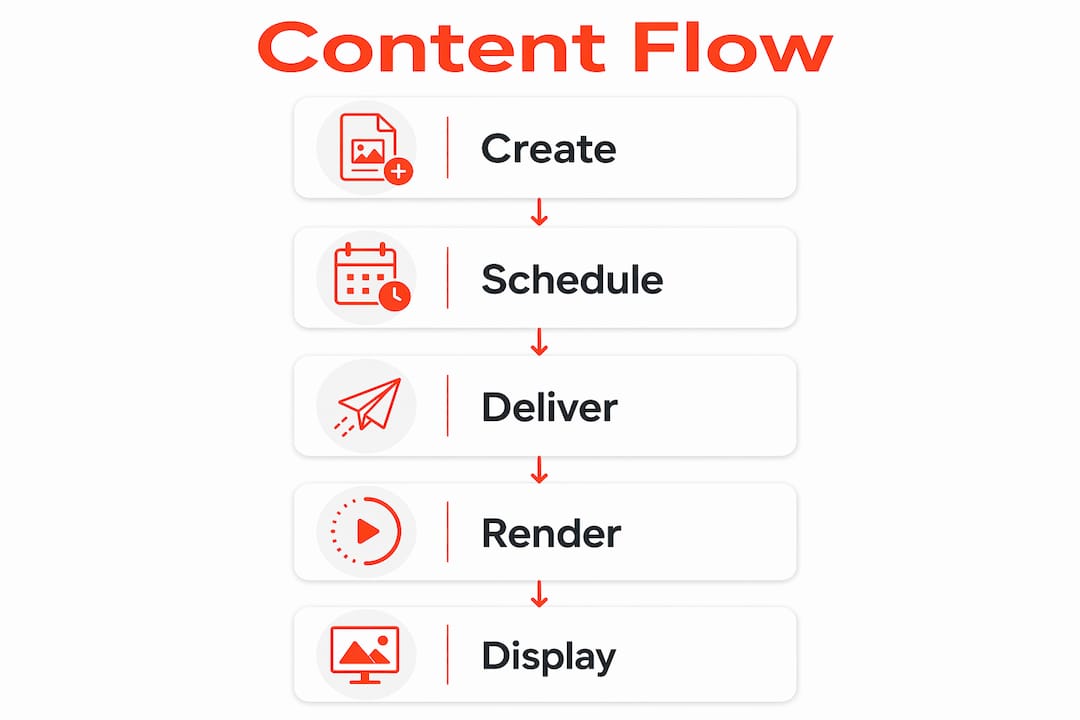
How does content flow from creation to display?
Content creation starts in the CMS, where you build playlists, set schedules, and assign content to specific screen groups or zones. From there, the system uses one of two delivery models to push that content out to media players.
Delivery Model | How It Works | Best For |
Push | CMS sends content directly to players on a set schedule | Immediate control, time-sensitive updates |
Pull | Players fetch content from the CMS at defined intervals | Large deployments, bandwidth efficiency |
Push delivery gives you immediate release control, which is critical for emergency alerts or flash promotions. Pull delivery scales better for large networks because players fetch updates asynchronously, reducing peak network load. Both models support local caching, which means screens keep playing content even when the network goes down. That offline-first capability is not optional. It is the foundation of a reliable system.
Pro Tip: Use delta sync, where only changed files transfer rather than full playlists, to cut bandwidth consumption significantly on large multi-screen deployments.
Once content reaches the media player, the player renders it on the display according to the schedule you set. You can divide a single screen into zones, running a promotional video in one area and a live event schedule in another. That flexibility is what separates a digital signage ecosystem from a simple slideshow.
What are the key components of digital signage systems?
Understanding digital signage systems means knowing what each component does and why it matters. Here are the core building blocks:
CMS Platform: The control hub. Manages content creation, scheduling, targeting, analytics, and device oversight. Cloud-hosted CMS options increasingly carry ISO 27001 security certification, while on-premises alternatives suit government or defense environments requiring air-gapped security.
Media Players: Dedicated hardware or software clients installed on smart TVs, commercial displays, or single-board computers. They cache content locally and render it on screen.
Display Hardware: Commercial-grade screens, video walls, outdoor displays, and kiosks. Consumer TVs work in low-demand settings, but commercial panels handle the heat and duty cycles of 24/7 operation.
Network Infrastructure: Wired or wireless connectivity linking the CMS to every player. Network design directly affects reliability and content delivery speed.
Emergency Alert Integration: Systems that connect to Common Alerting Protocol (CAP) feeds, allowing geo-filtered emergency alerts to override normal content instantly on targeted screen groups.
Health Monitoring and Proof-of-Play: Tools that verify content played correctly and flag device issues. Governance boards rely on fleet visibility data to confirm compliance and operational accuracy.
Pro Tip: Separate your CMS control plane from your media player endpoints on the network. This architecture means a CMS outage does not take your screens dark, because players keep running cached content independently.
Security deserves its own sentence here. Every connection between CMS and player is a potential vulnerability. Reputable platforms route content delivery through VPN tunnels or encrypted channels, and you should verify this before signing any contract.
How does a digital signage ecosystem improve community engagement?
The practical benefits of community engagement through signage go well beyond replacing a bulletin board. Here is where the ecosystem model pays off in real, measurable ways:
Targeted content delivery: Assign specific playlists to specific screen groups. A gym can show class schedules at the front desk, nutrition tips in the locker room, and promotional offers near the exit, all managed from one CMS.
Live data integration: Connect your CMS to live event calendars, social media feeds, weather APIs, or point-of-sale systems. Content updates automatically without manual intervention.
Promotional agility: Update a promotion across every screen in your network in seconds. Restaurants and retailers using this capability report faster response to inventory changes and time-sensitive offers.
Emergency alerting with guaranteed override: Systems integrated with CAP parse fields like urgency and severity, then deploy alert templates automatically to the right screens. Forced wake features bring sleeping displays online instantly.
Multi-site consistency with local flexibility: Centralized governance with local content slots lets a brand maintain global messaging standards while individual locations add relevant local content. This model is common in retail, banking, and hospitality.
Indoor and outdoor reach: Indoor deployments cover lobbies, break rooms, and meeting spaces. Outdoor displays extend communication to parking areas, building entrances, and public-facing storefronts.
The digital signage community benefits compound over time. Members and customers begin to rely on screens for accurate, current information. That trust is worth protecting with good governance and reliable hardware.
What best practices ensure a reliable signage ecosystem?
Planning a digital signage network for long-term success requires more than buying screens and subscribing to a CMS. Follow these steps to build a system that holds up:
Design for offline-first operation. Distributed architecture with local caching keeps screens running during network outages. Never deploy a system that goes blank when the internet drops.
Map your screen groups before you configure anything. Decide which screens serve which audiences, then build your content targeting around that map. Retrofitting targeting logic after deployment wastes time.
Integrate emergency alerts from day one. Connect to certified CAP sources and configure automated override templates. Test with your local emergency management agency and run scheduled drills to confirm the system works under real conditions.
Establish a content approval workflow. Define who can publish what, and to which screens. Without governance, off-brand or outdated content will appear on your displays.
Monitor device health continuously. Set up alerts for offline players, failed content downloads, and display errors. Proof-of-play reporting gives you the evidence you need to confirm campaigns ran as planned.
Plan for scale from the start. Choose a CMS and network design that can handle twice your current screen count without a full rebuild. Growth should be a configuration change, not a project.
Security and scalability are not afterthoughts. They are design decisions you make before the first screen goes live.
Key takeaways
A community digital signage ecosystem works because the CMS, media players, network, and displays function as one integrated system, not as separate tools bolted together.
Point | Details |
CMS is the control center | It manages scheduling, targeting, analytics, and device oversight across every screen. |
Offline-first design is non-negotiable | Local caching on media players keeps screens running even when the network fails. |
Push vs. pull delivery matters | Push gives immediate control; pull scales better for large, distributed deployments. |
Emergency alerts require dedicated setup | CAP integration with automated override templates and scheduled drills is required for reliable alerting. |
Governance drives long-term performance | Content approval workflows and proof-of-play reporting protect message quality and compliance. |
What i have learned deploying these systems
After evaluating and advising on digital signage deployments across gyms, retail chains, and community centers, the lesson that sticks with me is this: most organizations underinvest in governance and overinvest in screen hardware. A beautiful 4K display running unmanaged, stale content is worse than a modest screen showing accurate, timely information. The screen is not the product. The system behind it is.
The cloud versus on-premises debate is real, but it is simpler than vendors make it sound. Cloud-hosted CMS platforms work for the vast majority of community and business deployments. They are easier to manage, update automatically, and scale without infrastructure investment. On-premises makes sense only when you have a genuine security requirement, such as a government facility or a network that cannot touch the public internet. Do not let a vendor sell you on-premises complexity when cloud solves your actual problem.
The other thing I tell every manager I work with: test your emergency alerts before you need them. The worst time to discover your override system does not work is during an actual emergency. Schedule a drill every quarter. Confirm that forced wake works, that the right screens activate, and that your team knows the protocol. That preparation is what separates a signage ecosystem from a liability.
Finally, look hard at scalability before you commit to a platform. The right digital signage platform should add screens as a configuration step, not a billing shock. If a vendor charges per screen with no ceiling, your growth will cost you more than it should.
— DKS
How Signstream powers your community signage network

Signstream is built for exactly the kind of deployment this article describes. Its cloud-based CMS lets you update content across unlimited screens instantly from any device, with no technical expertise required. Whether you manage a gym, a retail chain, or a multi-site community organization, Signstream gives you real-time content control, scheduling by screen group, and analytics to track what is working. Elite sports clubs using Signstream have reported a 25% increase in class attendance after launch. The platform also includes an ad exchange marketplace, so you can cross-promote with local businesses and generate revenue from your own screens. Explore Signstream’s pricing plans to find the right fit, or visit Signstream’s main platform to see how it works in practice.
FAQ
What is a digital signage ecosystem?
A digital signage ecosystem is an integrated network of a CMS, media players, network infrastructure, and displays that work together to deliver dynamic, scheduled, and targeted content to screens. It differs from a standalone display by enabling centralized management, real-time updates, and performance reporting across multiple locations.
How does digital signage work in a community setting?
Content is created and scheduled in a CMS, then delivered to media players via push or pull delivery. Players cache content locally and render it on displays, keeping screens active even during network outages.
What are the key components of digital signage?
The core components are a CMS platform, media players, display hardware, network infrastructure, and optionally an emergency alert integration using Common Alerting Protocol (CAP). Health monitoring and proof-of-play reporting are also standard in well-designed systems.
Can digital signage systems send emergency alerts?
Yes. Systems integrated with CAP-compliant mass-notification feeds can automatically override normal content with geo-targeted emergency alerts on specific screen groups. Forced wake features bring sleeping displays online to deliver critical messages.
What is the difference between push and pull content delivery?
Push delivery means the CMS sends content directly to players on a schedule, giving you immediate control. Pull delivery means players fetch updates from the CMS at set intervals, which scales better for large networks and reduces peak bandwidth demand.
Recommended
Comments