

Best Quickesign.net Alternatives for Smart TV Signage 2026

The strongest quickesign.net alternatives available to US businesses right now are Signstream, Yodeck, OptiSigns, Play Digital Signage, TelemetryTV, ScreenCloud, Rise Vision, Xibo, Appspace, Videri, and Mvix. Of those, Signstream is the recommended pick for most small and mid-size operators, because it combines unlimited-screen deployment, a built-in ad exchange marketplace, and smart TV compatibility without per-screen cost penalties.
The shortlist breaks down into six practical categories:
Hardware-agnostic cloud platforms that run on existing smart TVs, Roku, Fire TV, and Google TV devices
SMB-friendly freemium systems with low entry costs and self-serve onboarding
Enterprise template and analytics platforms built for large-scale internal communications
Data-driven dynamic signage systems with real-time API feeds and interactive content
Low-cost per-screen tools suited to single-location deployments
Fully managed and custom channel providers with ad monetization and marketplace features
G2 and GetApp review signals consistently rank ease of use and real-time remote updates as the two highest-value features buyers cite when switching platforms. That finding shapes every recommendation below.
Pro Tip: Before committing to any platform, check whether it lists US-based support and a verifiable trial period. Platforms without both are harder to evaluate and slower to fix when something breaks on a live screen.

Table of Contents
Which quickesign.net alternatives should you compare first?
The table below maps the six platform categories across the dimensions that matter most: best-fit use case, pricing shape, hardware support, core features, scalability, setup complexity, and key integrations.
Category | Best for | Pricing model | Hardware support | Core features | Scalability | Setup ease | Notable integrations |
Hardware-agnostic cloud platforms | SMBs and franchises with mixed device fleets | Per-channel or unlimited screens | Smart TV apps, Roku, Fire TV, Google TV, Chromebox | Scheduling, templates, remote updates, analytics | High — central dashboard for multi-site | Low technical barrier | APIs, data feeds, QR codes |
SMB freemium systems | Single-location operators testing signage | Free tier + paid upgrades | Streaming devices, browser-based | Basic scheduling, template library | Limited — designed for small screen counts | Very easy | Social media, Google Slides |
Enterprise analytics platforms | Corporate comms, healthcare, large retail | Per-screen or site license | Proprietary players, Chromebox, Windows | Deep analytics, compliance tools, SSO | Very high — built for 100+ screens | Moderate — IT involvement needed | Active Directory, Salesforce, BI tools |
Data-driven dynamic signage | Retail, hospitality, tourism with live data needs | Per-screen or usage-based | Smart TV, Android, Windows | Live data feeds, dynamic QR codes, interactive content | High | Moderate | POS, weather APIs, CMS, Spotlio-style digital map integrations |
Open-source / self-hosted | Tech-savvy operators who want full control | Free software, hosting costs apply | Any device with a browser or media player | Scheduling, basic templates | Moderate — scales with infrastructure | High technical barrier | Custom via open APIs |
Managed custom channel providers | Franchises, fitness clubs, restaurants needing ad revenue | Subscription with marketplace revenue | Smart TV apps, streaming devices | Custom channels, ad exchange, analytics, QR codes | Very high — unlimited screens | Very easy | Ad networks, local business marketplaces |
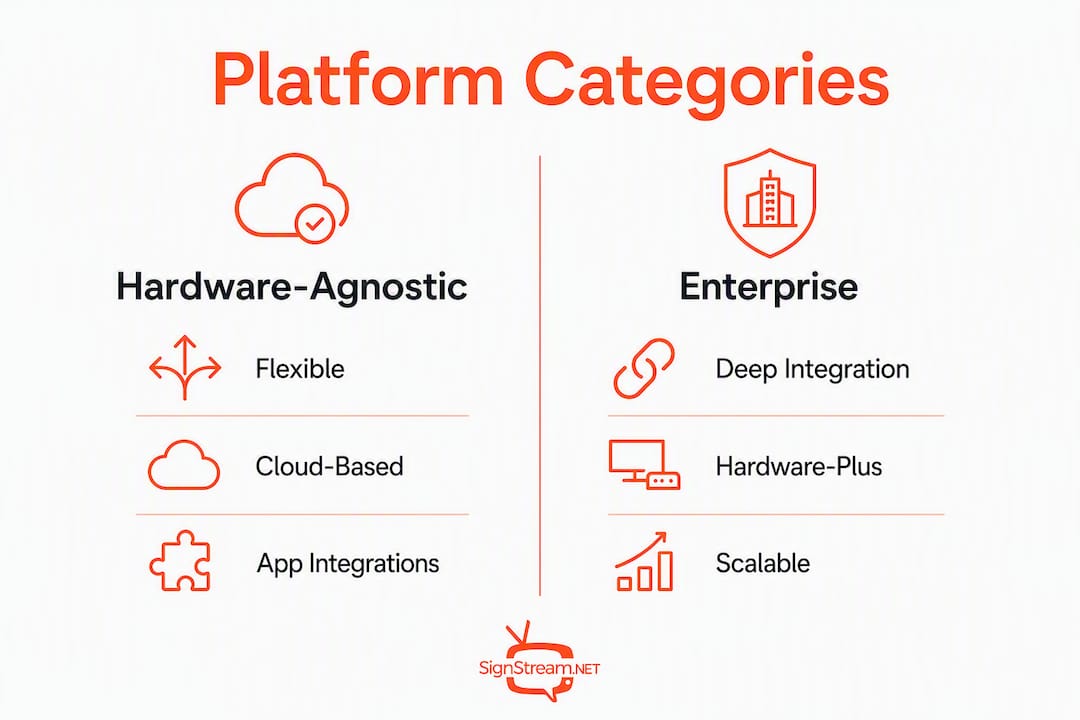
A few hardware notes worth calling out. Consumer streaming devices like Roku and Fire TV work well for small deployments, but they can create performance bottlenecks as networks grow. Platforms that support a hardware-agnostic cloud player give you a cleaner upgrade path. Proprietary media players deliver the most consistent performance but add upfront hardware cost. The sweet spot for most growing businesses is a platform that runs natively on smart TVs and streaming devices today, with the option to move to dedicated players later without switching software.
Pricing scales differently across categories. Per-screen models start low but can become expensive fast once you pass 10 or 15 screens. Unlimited-screen models cost more upfront but deliver far better total cost of ownership for franchises and multi-site operators.
How do you choose the right platform for your business?
A structured demo checklist saves you from choosing a platform that looks great in a sales call but struggles in your actual environment. Work through these steps before signing anything.
Push a live content update during the demo. Ask the rep to update a piece of content on three geographically separated screens simultaneously, then measure how long it takes to appear. Any lag over 60 seconds on a cloud platform is a red flag for real-time operations.
Test the template library against your use case. A restaurant operator needs menu-board templates; a gym needs class-schedule layouts. If the library requires heavy customization to get to a usable starting point, factor that time into your decision.
Verify scheduling depth. Can you schedule different content for different screens at different times, all from one dashboard? Single-schedule systems create operational headaches at scale.
Check analytics granularity. Basic view counts are table stakes. Look for dwell-time data, screen-specific performance, and export options for reporting.
Ask about ad monetization terms. If the platform offers a marketplace or ad exchange, read the revenue-share terms carefully before assuming it improves your ROI.
Confirm device management capabilities. Remote reboot, health monitoring, and automatic content recovery matter more than most buyers realize until a screen goes dark at 7 AM on a Monday.
Run the mobile update test yourself. Log into the platform on your phone and push a content change. If it takes more than three taps, your non-technical staff will struggle with it daily.
Prioritization by business size:
Single-location SMB: Prioritize ease of use, a strong template library, and a free trial. Cost per screen matters less when you have two or three screens.
Multi-site franchise: Central scheduling, brand-locked templates, and per-location analytics are non-negotiable. Model your total cost at 50 and 100 screens before committing to any per-screen pricing.
Enterprise internal comms: SSO, compliance features, and integration with existing HR or BI tools take priority over template variety.
Revenue-generating ad networks: Ad exchange capability and marketplace reach matter as much as content management. A platform without a monetization layer keeps signage as a cost center.
Per-screen pricing often results in higher total cost of ownership for multi-site rollouts, so model both pricing structures before your demo ends.
Pro Tip: During a live demo, ask the vendor to simulate a network outage on one screen and show you how the platform handles recovery. Platforms that auto-resume without manual intervention save significant operational time across large deployments.
What does each platform category actually offer?
SMB freemium platforms
These platforms target operators with one to five screens who want to test digital signage without a large upfront commitment. Entry-level tiers are typically free or under $20 per month per screen.
Pros:
Low or no cost to start
Browser-based setup with no technical expertise needed
Decent template libraries for common use cases
Cons:
Free tiers often limit screen count, content types, or update frequency
Analytics are basic at entry level
Per-screen pricing becomes expensive quickly past five screens
Buyers should verify: scheduling depth, template customization, and whether the free tier supports smart TV apps or requires a dedicated streaming device.
Hardware-agnostic cloud platforms
Platforms like Yodeck, OptiSigns, and Play Digital Signage fall into this category. They run on Roku, Fire TV, Google TV, Android, Chromebox, and Windows players, giving operators flexibility to use existing hardware.
Pros:
Works with devices you likely already own
Central cloud dashboard for remote management
Strong scheduling and template tools
Cons:
Per-screen pricing adds up for large networks
Consumer device performance limits can surface at scale
Support quality varies significantly by vendor
Rise Vision and ScreenCloud also compete here, with ScreenCloud emphasizing app integrations and Rise Vision leaning toward education and nonprofit deployments.
Enterprise platforms with deep integrations
Appspace, TelemetryTV, and Videri target large organizations that need SSO, compliance controls, and integration with tools like Salesforce, Active Directory, or BI dashboards. CB Insights notes these platforms are frequently chosen for corporate communications, healthcare, and large retail environments.
Pros:
Built for 100+ screen deployments
Deep integration ecosystem
Strong analytics and reporting
Cons:
Higher cost and longer implementation timelines
Overkill for SMBs and single-location operators
Often require IT involvement for setup and maintenance
Mvix sits in a similar space, with a hardware-plus-software model that suits buyers who want a single vendor for both the player and the platform.
Data-driven and dynamic signage systems
The market is shifting toward real-time data feeds, dynamic QR codes, and interactive content as differentiators. Platforms in this category connect to POS systems, weather APIs, social feeds, and commerce platforms to display content that changes based on live conditions.
Pros:
Content stays relevant without manual updates
QR codes and interactive elements drive measurable engagement
Strong ROI case for retail and hospitality
Cons:
Integration setup requires technical resources
Usage-based pricing can be unpredictable
Overkill for operators who only need static or scheduled content
Open-source and self-hosted options
Xibo is the most widely known open-source digital signage platform. It gives technically capable operators full control over their infrastructure at no software licensing cost.
Pros:
No licensing fees
Full customization
No vendor lock-in
Cons:
Requires server infrastructure and technical maintenance
No built-in ad marketplace or monetization layer
Support is community-based unless you pay for a managed hosting plan
Signstream: the recommended pick
Signstream is built for business operators who need to manage multiple screens without a dedicated IT team, and who want signage to generate revenue, not just display content.
Core features:
Unlimited screen deployment at no extra charge per screen
Real-time content updates from any device or browser
Custom channel management with scheduling and templates
Built-in ad exchange marketplace for cross-promotion and monetization
Dynamic QR codes and analytics
Smart TV app support across major streaming devices
Non-technical admin interface designed for gym managers, restaurant owners, and retail operators
Best for: Fitness clubs, restaurants, retail chains, franchises, and tourism operators who want to manage display networks affordably and turn screens into revenue drivers.
Signstream clients including elite sports clubs have reported a significant rise in class attendance after deploying the platform, a result tied directly to real-time class schedule updates and promotional content pushed to screens across the facility.
Pro Tip: Signstream’s ad exchange marketplace lets you cross-promote with other local businesses and sell ad space on your own screens. For a restaurant or gym with high foot traffic, that revenue can offset the platform cost entirely.
What do pricing models and deployment options actually cost?
Common pricing structures
Per-screen monthly: Typically $10–$50 per screen per month depending on feature tier. Cost-effective for one to five screens; expensive at scale.
Per-channel or per-location: A flat fee per location regardless of screen count. Better for multi-screen single-site operators.
Unlimited-screen subscription: A fixed monthly or annual fee covering any number of screens. The most cost-efficient model for franchises and growing networks.
Freemium with paid upgrades: Free for one or two screens with limited features; paid tiers unlock scheduling depth, analytics, and integrations.
Cost estimates by deployment size
Single location, 1–3 screens: A per-screen model at $20/month runs $60/month. An unlimited-screen platform at a flat $49/month is already more cost-efficient and gives you room to add screens without a cost increase.
Regional rollout, 10–50 screens: Per-screen pricing at $20/screen hits $1,000/month at 50 screens. An unlimited-screen model at $99–$199/month represents a fraction of that cost. Modeling both structures before committing is the single most important financial step for operators in this range.
Franchise, 100+ screens: Per-screen pricing becomes prohibitive. Unlimited-screen or enterprise site-license models are the only financially viable paths. Factor in central management tools, brand-template controls, and analytics as required features, not optional add-ons.
Hardware compatibility
Hardware type | Typical cost | Performance | Best for |
Smart TV native app | — | Good for 1–5 screens | SMBs, single locations |
Roku / Fire TV / Google TV | $30 per device | Moderate — can bottleneck at scale | Small deployments, BYO setups |
Chromebox / Windows player | — | Strong and consistent | Mid-size and enterprise |
Proprietary media player | — | Best performance and reliability | Large networks, 24/7 operations |
Hardware-agnostic platforms minimize setup costs by letting you reuse existing smart TVs and streaming devices. That said, consumer-grade devices have real limits for large or multi-site networks, and professional deployments often benefit from moving to dedicated players as the network grows.
How was this shortlist selected?
The platforms and categories in this article were selected using a consistent set of filters applied across review platforms, product documentation, vendor trial experiences, and US market availability data.
Sources used:
GetApp and Capterra for verified user review scores and feature ratings
G2 for buyer sentiment, ease-of-use signals, and competitive positioning
CB Insights for market-level competitor mapping and enterprise adoption signals
Techjockey US for curated US-market alternative lists and availability verification
Selection filters applied:
US market availability and US-based support options
Hardware-agnostic support or strong smart TV / streaming device compatibility
Trial or freemium availability for hands-on evaluation
Scalability features for multi-site and franchise deployments
Ad monetization capability as a differentiator
Verified review presence on at least one major aggregator
Review aggregator pages commonly list 15–20 candidates; this article narrows that to a focused shortlist because buyers who need to run demos and pilots benefit more from depth on fewer options than a surface-level scan of twenty.
One honest limitation: this comparison is based on publicly available information and vendor-stated features as of 2026. Feature sets change, pricing updates happen, and a live demo on your specific hardware is always the final validation step.
What results have Signstream clients actually seen?
Signstream’s client base spans fitness clubs, restaurants, retailers, and franchise operators across the United States. The outcomes below reflect real deployment results from those environments.
Measurable outcomes:
A fitness club client reported a 25% rise in class attendance after deploying Signstream to update class schedules and promotional content across facility screens in real time.
Restaurant operators have used Signstream’s scheduling tools to push daily specials and limited-time offers to dining room screens without touching a single device on-site.
Retail clients have activated the ad exchange marketplace to cross-promote with neighboring businesses, turning idle screen time into a revenue stream that partially offsets platform costs.
Deployment highlights:
Unlimited screens at no extra per-screen charge, making cost predictable regardless of how fast the network grows
Updates pushed from a mobile device or browser in seconds, with no technical staff required
Smart TV app support means most clients deploy on existing hardware with zero additional device spend
The custom channel management feature lets operators run branded content networks across every screen in a location simultaneously
For franchise operators specifically, the ability to manage digital signage across multiple locations from a single dashboard, with brand-locked templates and per-location scheduling, addresses the operational complexity that makes multi-site signage expensive to run on most other platforms.
Key Takeaways
Signstream is the strongest quickesign.net alternative for most US operators because it combines unlimited-screen deployment, a built-in ad exchange marketplace, and smart TV compatibility without per-screen cost penalties.
Point | Details |
Unlimited screens win at scale | Per-screen pricing becomes expensive past 10 screens; unlimited models cut total cost of ownership for franchises. |
Hardware-agnostic platforms save money | Running on existing smart TVs and streaming devices eliminates upfront hardware spend for most SMBs. |
Ad monetization changes the ROI math | Platforms with a built-in marketplace let operators earn revenue from screens, offsetting subscription costs. |
Ease of use is the top buyer priority | G2 and GetApp reviews consistently rank real-time updates and non-technical admin interfaces as the highest-value features. |
Signstream fits most US operators | Unlimited screens, ad exchange, smart TV support, and a 25% attendance lift for fitness clients make it the recommended pick. |
The real cost of choosing the wrong platform
Most buyers focus on the monthly subscription line and miss the two costs that actually determine whether a digital signage investment pays off: content operations and scaling economics.
Content operations is where platforms quietly fail. A system that requires a designer or a developer to push a menu update is not a signage platform for a restaurant. It is a liability. The platforms that win long-term are the ones where a manager can log in on a phone, change a price, and see it live on every screen in under two minutes. That capability is not universal, even among well-reviewed platforms.
Scaling economics is the other trap. A per-screen model at $15/month looks reasonable for three screens. At 30 screens across five locations, that same model costs $450/month before you add analytics or integrations. Operators who do not model their cost at 2x and 5x their current screen count consistently end up switching platforms 18 months in, absorbing migration costs they did not budget for.
The platforms that rely exclusively on consumer streaming devices also deserve scrutiny. Roku and Fire TV are excellent for small deployments, but they were not designed for 24/7 commercial signage. Reboots, app updates, and network hiccups that are minor inconveniences at home become operational problems when they happen on a screen in front of customers.
Signstream addresses all three of these pitfalls directly: unlimited screens keep costs flat as you grow, the non-technical admin interface means any staff member can manage content, and smart TV app support gives you hardware flexibility without locking you into consumer devices that may not hold up at scale.
Signstream: the practical alternative worth trying first
If you have been evaluating quickesign.net alternatives and want a platform that works on your existing smart TVs, scales to unlimited screens without cost penalties, and actually generates revenue through an ad exchange marketplace, Signstream is the place to start.

The platform is built for business operators, not IT departments. You can push a content update from your phone, run scheduled promotions across every screen in your location, and cross-promote with neighboring businesses through the built-in marketplace, all without touching a device on-site. Fitness clubs, restaurants, retailers, and franchise operators across the US use it for exactly that reason.
Start with a free trial to test Signstream on your actual hardware, check the interactive ad and monetization features, and see how the unlimited-screen model compares to what you are paying now. The how-it-works page walks through deployment options and device compatibility in plain language. Book a demo or start your pilot today.
Useful sources and where to read more
The following sources informed the shortlist, comparison criteria, and selection filters in this article.
GetApp — QuickESign Alternatives & Competitors: Verified user reviews and feature comparisons across digital signage platforms; useful for ease-of-use and satisfaction signals.
G2 — QuickESign Competitors & Alternatives: Buyer sentiment data, competitive positioning, and feature-level ratings that informed the demo checklist and pricing analysis.
Capterra — QuickESign Reviews: User-reported hardware compatibility issues and ease-of-use feedback that shaped the hardware tradeoffs section.
CB Insights — Top QuickESign Alternatives: Market-level competitor mapping and enterprise adoption context for the platform category profiles.
Techjockey US — 20 Best QuickESign Alternatives — US-market availability verification and curated candidate lists used to confirm platform accessibility for American buyers.
Recommended
Comments