

Best Amazon Signage Stick Alternatives for Business in 2026

What are the top alternatives to Amazon Signage Stick?
If you’re searching for signage.amazon.com alternatives that offer more control, better reliability, and a management experience built for real business use, the field has narrowed to a clear set of contenders. BrightSign, Xibo, ScreenCloud, OptiSigns, Yodeck, and Signstream each solve the core problem differently, and the right choice depends on how many screens you run, how much technical overhead you can absorb, and what you actually need your screens to do.
The Amazon Signage Stick is a budget entry point, priced affordably, and it works well enough for a single screen in a low-stakes environment. But it was not built for 24/7 commercial operation, and it shows. The moment you need remote management across multiple locations, content scheduling, or reliable uptime, you start looking elsewhere.
Platform | Ease of setup | Hardware/OS architecture | CMS control | Reliability | Key features | Pricing model |
BrightSign | Moderate (20–30 min) | Purpose-built signage OS | BrightSign Network or third-party CMS | Enterprise-grade, 24/7 rated | interactive, wide temp range | $200–$500 hardware + $60–$100/player/year CMS |
Xibo | Technical (Linux/Pi setup) | Player-first, Linux/Raspberry Pi | Self-hosted or cloud CMS | High with kiosk auto-recovery | Open-source, kiosk mode, health monitoring | Free open-source; cloud plans vary |
ScreenCloud | Very easy | CMS-first, any screen/OS | Cloud dashboard | Good for standard deployments | App integrations, team collaboration | Subscription per screen/month |
OptiSigns | Easy | CMS-first, Fire Stick/Android/web | Cloud dashboard | Good for SMB use | Templates, scheduling, social feeds | From ~$10/screen/month |
Yodeck | Easy (free Pi included) | CMS-first, Raspberry Pi | Cloud dashboard | Good; Pi hardware caveats apply | Free tier, scheduling, widgets | Free tier; paid plans per screen |
Signstream | Very easy | Cloud-first, any screen | Cloud dashboard, ad exchange | High; built for multi-location | Unlimited screens, ad marketplace, analytics | Contact for pricing |
BrightSign is the enterprise standard for mission-critical deployments. Xibo suits technically capable teams who want open-source flexibility. ScreenCloud, OptiSigns, and Yodeck all take a CMS-first approach that trades some hardware control for ease of use. Signstream stands apart by combining a no-technical-expertise interface with an ad exchange marketplace that lets your screens generate revenue, not just display content.
Table of Contents
How do the leading digital signage alternatives actually compare?
What technical factors actually drive signage hardware reliability?
How do you choose the right Amazon Signage Stick alternative for your business?
Why most businesses pick the wrong signage hardware the first time
Signstream gives your screens a job beyond displaying content
How do the leading digital signage alternatives actually compare?
Hardware and CMS architecture
The biggest practical difference between these platforms is not the feature list. It is the relationship between the hardware player and the content management system. BrightSign devices cost $200–$500 per unit, but they run a signage-hardened OS designed for 24/7 operation, with solid-state storage and no SD cards to fail. That upfront cost buys you predictable behavior across years of deployment.
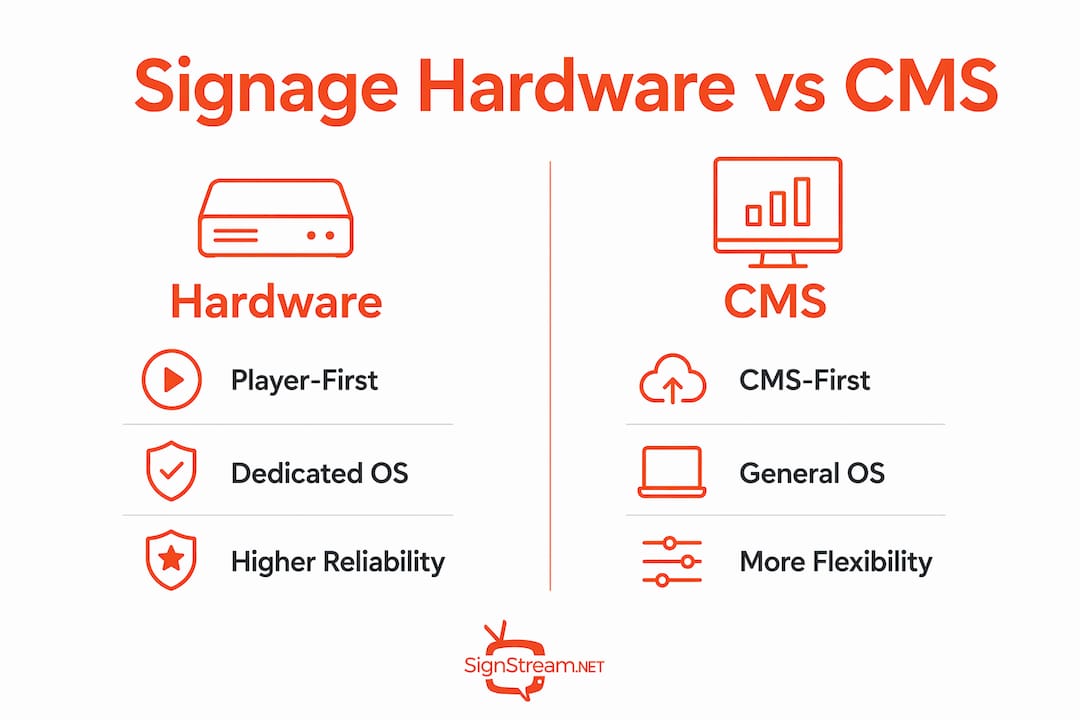
Xibo takes a player-first approach, building dedicated endpoint images that launch directly into the player and connect to the CMS. This architecture means the device’s entire purpose is running your signage, not running a general-purpose Android OS that happens to have a signage app installed. The distinction matters when you are managing 20 or more screens across locations.
ScreenCloud, OptiSigns, and Yodeck all operate CMS-first. You install their app on whatever hardware you already have, whether that is a Fire Stick, an Android box, or a Raspberry Pi, and the cloud dashboard becomes your control plane. Setup is faster, but you inherit whatever reliability limitations come with your chosen hardware.
Ease of setup and end-user friendliness
BrightSign: 20–30 minutes per device; requires network configuration and CMS account setup. Not difficult for an IT-capable team, but not plug-and-play.
Xibo: The most technical setup of the group. Kiosk deployments on Linux or Raspberry Pi require familiarity with command-line tools and systemd services.
ScreenCloud: Browser-based onboarding; most users are live within minutes. Strong app integrations with tools like Google Slides, Canva, and Slack.
OptiSigns: Similar ease to ScreenCloud. Works on Fire Sticks, Android devices, and web browsers. Templates and drag-and-drop scheduling reduce the learning curve.
Yodeck: Ships a free pre-configured Raspberry Pi with annual plans, which removes the hardware sourcing step entirely. The cloud dashboard is clean and approachable.
Signstream: Designed from the ground up for business owners without technical backgrounds. Content updates push to multiple screens instantly from any device, and the interface requires no IT support.
Pricing and US market availability
All six platforms are available in the United States. BrightSign’s LS5 starts at $200, with cloud management adding $60–$100 per player per year. OptiSigns pricing starts at low monthly rates per screen. Yodeck offers a tier suitable for single-screen deployments, which makes it genuinely useful for small businesses testing the waters. Signstream’s pricing is available on request and scales to unlimited screens without per-screen charges, which changes the math significantly for multi-location operators.
Pro Tip: Before comparing monthly software costs, calculate your total cost of ownership over three years. A $10/month platform running on $50 Fire Sticks that need replacing every two years often costs more than a purpose-built player with a five-year lifespan.
What technical factors actually drive signage hardware reliability?
Most buyers focus on specs: resolution support, processor speed, storage capacity. Practitioners who manage large deployments focus on something different. Operational stability in signage hardware is driven primarily by firmware and OS lifecycle management, not raw device performance.
Player-first vs. CMS-first architectures
These two design philosophies produce very different operational outcomes. A player-first system, like Xibo’s kiosk architecture, builds the entire endpoint around the signage player. The device boots into the player, connects to the CMS, and does nothing else. If the network drops, the player keeps displaying cached content. If the app crashes, auto-recovery mechanisms restart it automatically.

A CMS-first system installs a signage app on top of a general-purpose OS. That OS receives updates on its own schedule, runs background processes, and may behave differently across hardware variants. For a single screen in a coffee shop, this is fine. For a 50-screen retail network where a content freeze at 9 AM costs real money, it is a meaningful risk.
The Android fragmentation problem
Android-based signage players carry a specific operational risk that budget buyers often underestimate. Android devices are manufactured by dozens of vendors, each shipping different hardware configurations and OS versions. A signage app certified on one Android box may behave unpredictably on another, even from the same manufacturer’s next product cycle. Security patches arrive inconsistently, and OS updates can break app compatibility without warning.
Android OS fragmentation creates inconsistent behavior across device batches
Security updates depend on the hardware vendor, not the signage software vendor
Hardware end-of-life often arrives before the signage deployment’s expected lifespan
App store dependencies can remove or update a signage app without operator control
BrightSign sidesteps this entirely by controlling both the hardware and the OS. Xibo’s kiosk reference architecture addresses it on Linux by using GNOME Kiosk session management with systemd services that auto-restart the player if it crashes, and health monitoring that reports endpoint status back to the CMS. This kind of auto-recovery is what separates a professional deployment from a setup that requires someone to physically reboot a screen every few weeks.
Key reliability principle: The signage-hardened OS lifecycle and firmware controls matter more than media playback specs when evaluating hardware for long-term commercial deployment.
How does Signstream perform in real business environments?
Signstream was built for the business owner who needs screens to work, not for the IT administrator who enjoys configuring them. That focus shows up in every part of the platform.
Client outcomes and engagement results
Signstream clients include elite sports clubs, restaurants, and retailers who have reported measurable improvements after deployment. One of the most cited results is a 25% rise in class attendance at sports clubs following implementation, driven by real-time schedule updates and promotional content pushed to screens across the facility. That kind of outcome comes from the ability to update content instantly from any device, without logging into a desktop app or waiting for a scheduled sync.
The platform’s accessible interface is designed so that any team member can manage content, not just whoever set the system up. This matters more than most buyers realize. A digital signage system that only one person knows how to operate becomes a bottleneck the moment that person is unavailable.
The ad exchange marketplace
Signstream includes an ad exchange marketplace that most digital signage platforms do not offer. Business owners can cross-promote with other local businesses and generate revenue from their own screens, turning a cost center into a revenue stream. For a gym, restaurant, or retail location with high foot traffic, this changes the return-on-investment calculation entirely. You can also explore Signstream’s ad display network to understand how the monetization model works in practice.
Signstream deploys to unlimited screens at no extra per-screen charge, which makes it particularly well-suited for franchise operators and multi-location businesses. Managing digital signage across franchises is one of the more complex operational challenges in the category, and Signstream’s cloud-first architecture handles it without requiring on-site technical support at each location.
How do you choose the right Amazon Signage Stick alternative for your business?
The right platform depends on three variables: how many screens you manage, how much technical capacity your team has, and what you need the screens to actually do. Getting this wrong is expensive, not just in hardware costs but in the time spent managing a system that does not fit your operation.
Critical evaluation criteria
Setup complexity: If your team has no IT background, eliminate any platform that requires Linux configuration or command-line setup. Xibo and custom Raspberry Pi deployments are powerful but demand real technical skill.
Reliability requirements: Screens in a hospital lobby, airport gate, or 24/7 retail environment need purpose-built hardware. Screens in a small office or single-location restaurant can tolerate a more budget-oriented approach.
Budget structure: Compare total cost of ownership over three years, not just the monthly software fee. Hardware replacement cycles, support costs, and per-screen licensing all add up.
Management interface: Test the CMS before you commit. A platform that looks simple in a demo but requires three menus to change a single slide will frustrate your team within a month.
Feature requirements: Social media feeds, interactive touchscreen content, and analytics dashboards are not universal. Know which features you will actually use before paying for them.
Compatibility and integrations
Most CMS-first platforms support Google Slides, Canva, and common social media feeds out of the box. BrightSign integrates with a wide range of third-party CMS platforms, including enterprise tools used in retail and hospitality. Signstream’s cloud architecture works across screen types and operating systems, and its analytics give you performance data to adjust content strategy over time.
For businesses managing affordable digital signage across small teams, the key is finding a platform where the management overhead stays low as you add screens. A system that requires manual updates per screen does not scale.
Pro Tip: Run a 30-day pilot on two or three screens before committing to a full deployment. The issues that matter most, such as content freeze frequency, update lag, and CMS usability, only surface under real operating conditions.
Security and data privacy
Purpose-built players like BrightSign control their own firmware updates and security patches, which gives IT teams a predictable patching schedule. Android-based players depend on the hardware vendor for OS security updates, which may arrive late or not at all. Cloud-based CMS platforms should offer role-based access controls, encrypted content delivery, and audit logs. Ask any vendor directly about their data residency practices if your business operates under specific compliance requirements.
Support options
BrightSign offers enterprise support contracts. Xibo provides community forums and paid support tiers. ScreenCloud, OptiSigns, and Yodeck all offer email and chat support on paid plans. Signstream provides direct support and offers an on-site consultation for businesses that want a tailored deployment plan rather than a self-serve setup.
Key Takeaways
Purpose-built signage hardware and cloud-first platforms each solve different problems; matching the architecture to your operational needs is the decision that determines long-term success.
Point | Details |
Hardware architecture matters | Player-first systems like BrightSign and Xibo offer better uptime than Android-based alternatives for 24/7 deployments. |
Android fragmentation is a real risk | OS and hardware inconsistency across Android devices creates unpredictable behavior and security gaps in commercial signage. |
Total cost of ownership | BrightSign’s $200–$500 hardware cost often delivers lower three-year TCO than budget players requiring frequent replacement. |
CMS-first suits smaller teams | Platforms like OptiSigns and Yodeck reduce setup time and work well for businesses running fewer than 20 screens. |
Signstream for multi-location businesses | Signstream deploys to unlimited screens with no per-screen charge, plus an ad exchange marketplace that turns screens into a revenue source. |
Why most businesses pick the wrong signage hardware the first time
The conventional wisdom in digital signage buying is to start cheap and upgrade later. Buy a Fire Stick, install a free app tier, see if it works. The logic sounds reasonable, and for a single screen in a break room, it probably is. But for a business running five or more screens across customer-facing locations, that approach tends to produce a specific kind of frustration: screens that freeze during peak hours, content that does not update when you need it to, and a management interface that requires more attention than the screens are worth.
What most buyers underestimate is how much of the total cost lives in operational time, not hardware. A $50 Fire Stick that needs rebooting twice a week, or a CMS that requires manual updates per screen, costs far more in staff time over a year than a purpose-built player that simply runs. The signage-hardened OS argument is not about premium hardware for its own sake. It is about removing a category of operational problem entirely.
The other thing buyers consistently underestimate is the value of a platform that non-technical staff can actually use. A system that only your most tech-savvy employee can manage is not a business tool. It is a dependency. Signstream’s design philosophy addresses this directly: any team member can update content, push promotions, and manage screens across locations without IT involvement. For a gym operator, a restaurant group, or a retail chain, that operational independence is worth more than any individual feature on a spec sheet.
The best digital signage investment is the one your team will actually use, maintain, and build on over time. Start with your operational reality, not the lowest price point.
Signstream gives your screens a job beyond displaying content
Every platform covered in this article will put content on a screen. Signstream does something more specific: it gives business owners a way to manage multiple screens from anywhere, without technical expertise, and to turn those screens into a revenue source through its built-in ad exchange marketplace.

For gyms, restaurants, retailers, and multi-location operators who want real-time content control without hiring an IT team, Signstream is the practical alternative to both enterprise hardware stacks and generic CMS platforms. There are no per-screen charges as you grow, and the ad marketplace means your screens can cross-promote with local businesses and generate income alongside your own content. Clients have reported a 25% rise in class attendance after deployment, demonstrating real business impact.
If you want to see how Signstream fits your specific setup, book a free consultation and get a clear picture of what deployment looks like for your business.
Recommended
Comments